
In the early days of the internet, sending an email was as simple as connecting two computers. Today, it is a gauntlet of cryptographic handshakes, reputation algorithms, and complex routing protocols. For the modern business, the “Send” button is merely the first domino in a high-stakes digital sequence.
To master email at scale, one must move beyond the surface level and understand the “engine” that powers the inbox: the SMTP Relay.
Part 1: The Physics of SMTP
What is the Simple Mail Transfer Protocol?
At its core, SMTP (Simple Mail Transfer Protocol) is a TCP/IP protocol used in sending and receiving email. However, because it is limited in its ability to queue messages at the receiving end, it is usually used with one of two other protocols, POP3 or IMAP, that let the user save messages in a server mailbox and download them periodically from the server.
In simpler terms, SMTP is the “delivery truck” of the internet. It doesn’t care what is inside the package; its only job is to get the package from Point A to Point B using a specific set of traffic laws.
The Role of the MTA (Mail Transfer Agent)
To understand a relay, you must understand the MTA. When you send an email, your computer communicates with an MTA. The MTA is software that transfers electronic mail messages from one computer to another using SMTP.
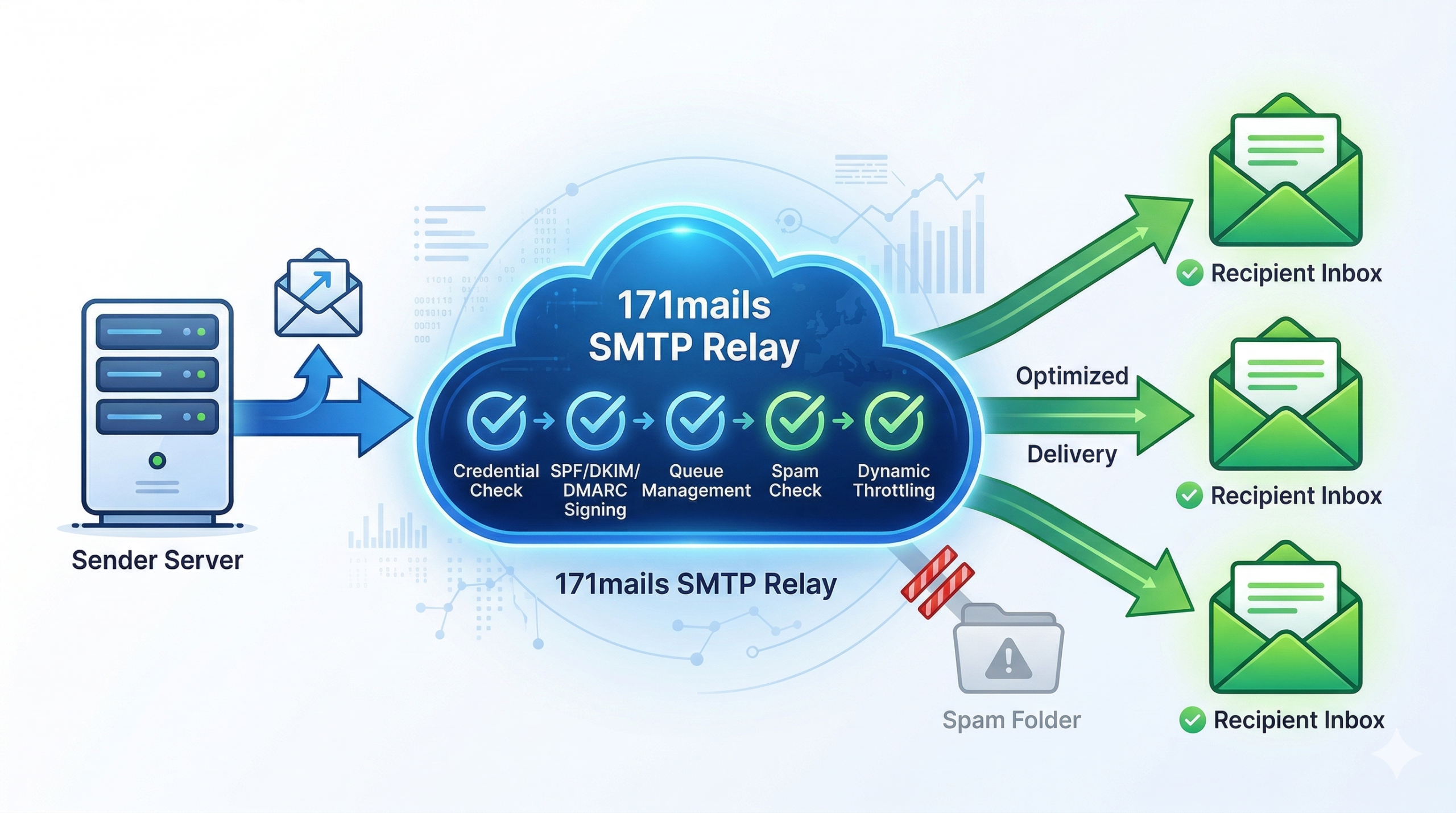
A Relay occurs when an MTA receives an email from another MTA and then “relays” it to a third MTA. In a professional ecosystem, your application serves as the initial sender, and the Relay Service serves as the specialized MTA that handles the heavy lifting of global distribution.
Part 2: The Anatomy of a Mail Transfer
To truly grasp why a specialized relay is necessary, we must look at what happens in the milliseconds after you trigger a send. The process is a four-step dialogue between servers:
1. The Handshake (HELO/EHLO)
The sending server connects to the receiving server and identifies itself. In a professional relay setup, this isn’t just a greeting; it’s a presentation of credentials. The receiving server looks at the IP address and the hostname to see if they match.
2. The Sender Identification (MAIL FROM)
The sender tells the receiver who is sending the mail. This is where SPF (Sender Policy Framework) comes into play. The receiving server checks the DNS records of the “From” domain. If the IP address of the relay isn’t on the “approved list,” the email is often rejected immediately.
3. The Recipient Designation (RCPT TO)
The sender specifies the destination. A sophisticated relay will check its internal “Suppression List” at this stage. If the recipient has previously bounced or marked a message as spam, the relay stops the send before it even leaves the building, protecting the sender’s reputation.
4. The Data Transmission (DATA)
Finally, the content of the email—the headers, the body, and the attachments—is transmitted. Before the receiving server accepts the “End of Data” signal, it validates the DKIM (DomainKeys Identified Mail) signature. This is a digital watermark that proves the content wasn’t tampered with during transit.
Part 3: Why Standard Servers Fail at Scale
Most businesses attempt to use their web host’s default mail server or a basic office suite (like Gmail) for their automated traffic. For low-volume personal mail, this is fine. For business-critical infrastructure, it is a recipe for failure.
The “Neighborhood” Effect (Shared IPs)
Standard mail servers use shared IP addresses. Imagine living in an apartment building where one tenant is constantly causing trouble. Eventually, the police might start watching the whole building. In email, if one person on a shared IP sends spam, the “reputation” of that IP drops. Major ISPs like Gmail and Yahoo will then block all mail coming from that IP, regardless of who the sender is.
Throttling and Greylisting
ISPs use a technique called Greylisting. When they see mail from an unrecognized server, they intentionally “fail” the first delivery attempt. They expect a legitimate server to try again a few minutes later (Spam bots usually don’t bother). A professional SMTP relay is designed to handle these “retries” gracefully. A standard web server might simply give up, leading to “lost” emails.
Part 4: The Pillars of Reputation Management
If you want your emails to land in the “Primary” tab instead of the “Spam” folder, you must treat your Sender Reputation as a financial asset. It is built on three pillars:
1. IP Reputation
This is a score assigned to your sending IP address by various “Watchdog” organizations (like Spamhaus or Barracuda). It is based on:
-
Volume Consistency: Do you send 10 emails one day and 1 million the next? (This looks like a hacked server).
-
Bounce Rates: High hard-bounce rates suggest you are using an old or bought list.
-
Spam Traps: These are “honeypot” email addresses that haven’t been used in years. If you hit one, it proves you aren’t cleaning your lists.
2. Domain Reputation
Even if you change your IP address, your domain (e.g., @https://www.google.com/search?q=yourbusiness.com) carries its own history. This is why properly configuring DMARC (Domain-based Message Authentication, Reporting, and Conformance) is vital. DMARC tells the receiving server exactly what to do if an email fails authentication—whether to “quarantine” it or “reject” it outright.
3. Content Analysis
Modern AI filters at Gmail and Outlook don’t just look at IPs; they “read” the mail. They look for:
-
Link-to-Text Ratios: Too many links and too little text is a red flag.
-
Hidden Text: Using white text on a white background to “stuff” keywords.
-
Urgency Phrasing: Excessive use of “Act Now!” or “Click Here!” in the subject line.
Part 5: Technical Implementation – Integrating a Relay
For developers and IT managers, integrating an SMTP relay is usually a choice between two paths: SMTP Authentication or Web APIs.
SMTP Authentication (The Universal Fit)
Most legacy systems, CRMs, and plugins (like WordPress) are built to use SMTP. You simply replace “localhost” with the relay’s host address, enter your API key as the password, and change the port to 587 (the modern standard for secure SMTP).
The Power of HTTP APIs
For modern SaaS applications, using a RESTful API is often preferred.
-
Speed: APIs are generally faster as they require fewer “round-trips” between servers.
-
Security: APIs can be restricted by IP or specific permissions.
-
Rich Data: APIs often allow you to send “metadata” along with the email, which can be used for advanced tracking and personalization later.
Part 6: Measuring Success Beyond the “Send”
A professional relay provides a feedback loop that standard servers cannot. To optimize your communication, you must track:
Hard Bounces vs. Soft Bounces
-
Hard Bounce: The email address doesn’t exist. This address must be removed immediately.
-
Soft Bounce: The mailbox is full or the server is temporarily down. The relay will retry these automatically.
Open Rates and Heatmaps
By using a relay, every link in your email can be automatically wrapped in a tracking parameter. This tells you not just if they opened the mail, but what part of your message caught their eye.
Summary: Future-Proofing Your Communication
The landscape of email is constantly shifting. New regulations like the GDPR in Europe and the CAN-SPAM Act in the US require businesses to have strict control over their outbound mail.
An SMTP relay is no longer just a technical utility; it is the strategic foundation of your digital presence. By understanding the mechanics of the protocol and the importance of reputation management, you ensure that your message—no matter how large your audience—always finds its way home.