
In the digital ecosystem of 2026, not all emails are created equal. For businesses using 171mails, understanding the distinction between transactional and marketing communication is the difference between a seamless user experience and a total deliverability collapse.
While they both end up in an inbox, they serve different masters, follow different laws, and—most importantly—require different infrastructure.
1. What is a Transactional Email?
A transactional email is a functional, automated message triggered by a user’s specific action. These are “need-to-know” communications.
-
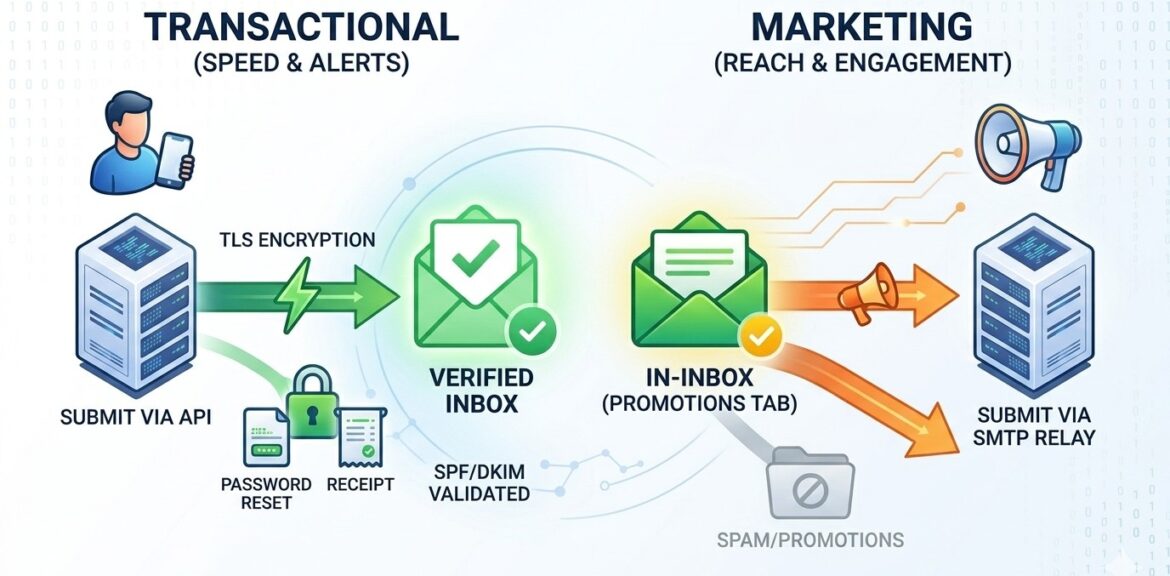
Examples: Password resets, shipping confirmations, purchase receipts, account alerts, and 2FA codes.
-
The Expectation: Immediate delivery. If a user requests a password reset and it doesn’t arrive in 30 seconds, they lose trust in the brand.
-
Legal Standing: In most jurisdictions (like GDPR or CAN-SPAM), transactional emails are exempt from many “unsubscribe” requirements because they are considered essential for the service.
2. What is a Marketing Email?
Marketing emails are commercially motivated messages sent to a list of subscribers. These are “want-to-know” communications.
-
Examples: Newsletters, sale announcements, product updates, and promotional “drip” campaigns.
-
The Expectation: Consistent scheduling and high engagement. While speed is good, landing in the “Promotions” or “Primary” tab is the goal.
-
Legal Standing: These require a clear, functional unsubscribe link and explicit prior consent from the recipient.
The Infrastructure Dilemma: Why You Should Separate Them
The most common mistake businesses make is sending both types of mail from the same IP address. Here is why that is dangerous:
The Reputation Risk: Marketing emails naturally have higher spam complaint rates. If your marketing campaign gets flagged by users, it lowers the reputation of your IP address. If your password resets are coming from that same IP, they will also start going to the spam folder.
The Solution at 171mails: We recommend using a “Subaccount” or “Dedicated IP” strategy. Use one set of credentials for your high-priority transactional alerts and a separate set for your marketing blasts. This ensures that even if a promotional campaign has a rough day, your receipts and alerts remain 100% reliable.
Technical Requirements: SMTP vs. API
-
SMTP Relay: Best for “set and forget” systems like WordPress or existing CRMs. It is universal and easy to configure.
-
Email API: Best for transactional mail. It is faster, more secure, and allows developers to handle complex data (like dynamic receipt tables) with much higher efficiency.
Summary
You don’t need to choose between them; you likely need both. The key is to manage them with professional-grade infrastructure like 171mails to ensure your “Essential” mail stays fast and your “Promotional” mail stays visible.